
Download SoftEther VPN Client – Free, Secure Multi-Protocol VPN for Windows, Mac, Android & iOS
SoftEther VPN Client is a powerful, free, and secure multi-protocol VPN solution developed by the SoftEther Project. Designed to deliver high-speed, low-latency connections, this software stands out as a top alternative to OpenVPN and Microsoft’s SSTP VPN clients. With its unique ability to tunnel Ethernet over HTTPS, SoftEther bypasses even the most restrictive firewalls and deep packet inspection systems.
It supports multiple protocols including SSL-VPN, IPsec, EtherIP, and MS-SSTP, ensuring maximum compatibility across diverse networks. Whether you're setting up a remote access VPN or a site-to-site connection, SoftEther provides a seamless, virtual Ethernet layer that functions like a physical LAN. The software is ideal for both home users and enterprises seeking a reliable, free, and feature-rich networking tool.
Its ability to run behind NAT and firewalls without complex configuration makes it a favorite among IT professionals and privacy-conscious users alike. With regular updates and strong community support, SoftEther VPN Client remains one of the most trusted open-source VPN tools available today.
Key Features of SoftEther VPN Client
SoftEther VPN Client offers a comprehensive suite of features that make it a standout in the world of free VPN software. One of its most powerful features is its multi-protocol support, allowing users to connect via SSL-VPN, IPsec, EtherIP, and MS-SSTP. This flexibility ensures compatibility with a wide range of servers and network infrastructures, making it an excellent choice for businesses and individuals using mixed environments. The SSL-VPN protocol is particularly impressive—it encapsulates Ethernet frames within HTTPS traffic, enabling the connection to bypass firewalls and deep packet inspection (DPI) systems. This makes it ideal for users in restrictive network environments like schools, offices, or countries with strict internet censorship.
Another major advantage is its NAT traversal capability, which allows users to establish secure connections even when behind complex NAT configurations or corporate firewalls. This feature is especially useful for remote workers who need to access their company’s internal network from home. SoftEther also supports virtual network adapters and virtual Ethernet switches, enabling true Layer 2 (L2) VPN functionality. This means your device behaves as if it's physically connected to the same local network, allowing access to shared drives, printers, and internal services as if you were on-site.
For users migrating from other systems, SoftEther includes a clone function that allows seamless integration from OpenVPN configurations. This simplifies the transition process and reduces setup time. Additionally, the software is completely free and open-source, with no hidden fees or subscription models. Regular security updates and a strong development team ensure the software remains secure and up-to-date. Whether you're setting up a personal home network or managing a corporate infrastructure, SoftEther’s feature set is both robust and future-proof.
Installation & Usage Instructions
Installing SoftEther VPN Client is straightforward and compatible with multiple platforms. For Windows users, download the installer from the official SoftEther Project website. Run the executable file and follow the on-screen prompts.
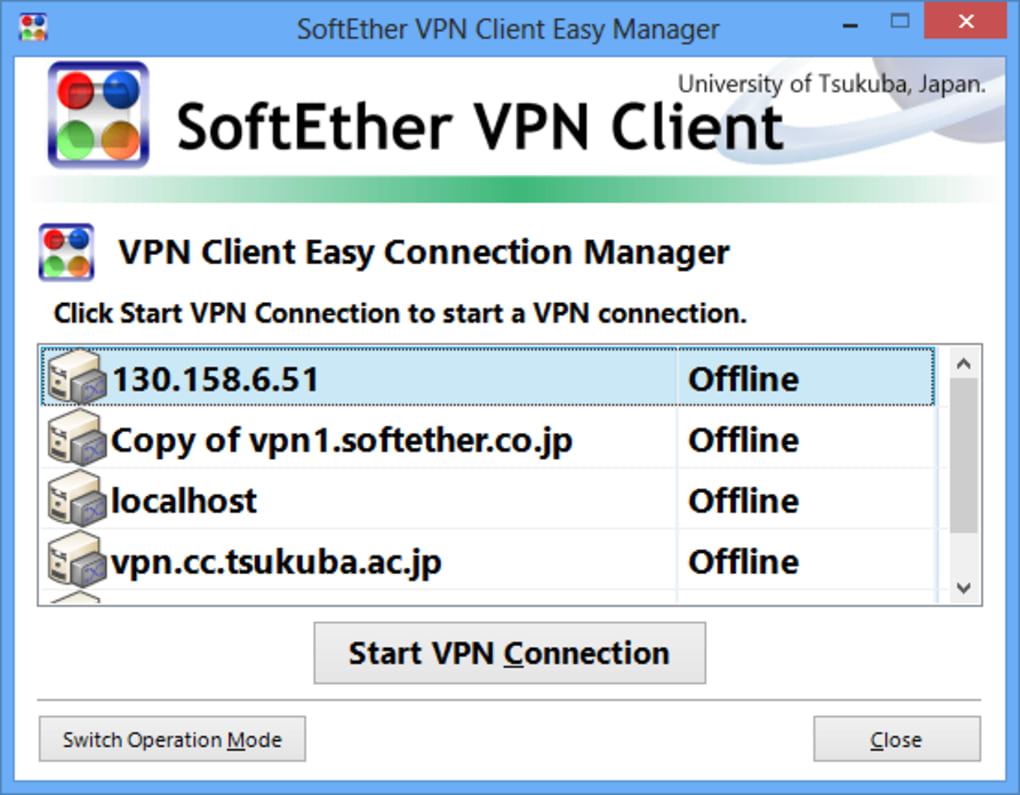
During installation, you’ll be prompted to choose between a standard or custom setup. The default options are sufficient for most users. Once installed, launch the application and click on “Create New Connection” to begin setting up your VPN session.
When configuring a new connection, you’ll need to input the server address, port, and protocol (e.g., SSL-VPN, IPsec). You can also specify authentication methods such as username/password or certificate-based login. For advanced users, SoftEther supports custom configuration files and command-line tools, offering granular control over network behavior. After saving the configuration, simply select the connection and click “Connect” to establish the tunnel.
On MacOS, the process is similar. Download the DMG file, open it, and drag the application to your Applications folder. The client runs as a background service, and you can manage connections through the GUI.
For Linux users, SoftEther provides a command-line interface (CLI) and scripts for easy integration into server environments. Mobile support is available via the SoftEther VPN Client for Android and iOS, though it lacks a full GUI and requires more technical knowledge to configure. Despite this limitation, the mobile apps are functional and allow basic connection management.
Once connected, you’ll notice a new network interface in your system’s network settings. This virtual adapter enables full LAN-like connectivity. To disconnect, simply return to the client and click “Disconnect”. The entire process is intuitive, even for users with limited networking experience. Regular updates are released to fix bugs, improve performance, and patch security vulnerabilities, so it’s recommended to keep the software up to date.
Compatibility & System Requirements
SoftEther VPN Client is designed to run on a wide range of operating systems, making it one of the most versatile free VPN tools available. It supports Windows 7 and later, including Windows 10 and Windows 11, with full GUI support. For Mac users, the software is compatible with macOS 10.13 (High Sierra) and above, ensuring smooth performance on modern Apple devices. Linux distributions such as Ubuntu, Debian, and CentOS are also supported, with dedicated packages and scripts for easy installation.
On mobile platforms, SoftEther offers clients for Android (5.0+) and iOS (12.0+). While these apps are functional, they lack a full graphical interface and rely on manual configuration through text-based inputs. This may be a barrier for less technical users but is acceptable for those familiar with network settings. The software is lightweight and does not consume excessive system resources, making it suitable for older machines or low-end devices.
Hardware requirements are minimal—SoftEther runs efficiently on systems with at least 1 GB of RAM and a 1 GHz processor. Storage space is also minimal, requiring only around 100 MB for installation. The client does not require administrator rights to run in most cases, although certain advanced features may need elevated privileges. For enterprise deployments, the software integrates well with existing IT infrastructure and supports centralized management through the SoftEther Server.
Pros & Cons of SoftEther VPN Client
- Pros:
- Completely free and open-source software
- Supports multiple protocols: SSL-VPN, IPsec, EtherIP, MS-SSTP
- Excellent firewall and NAT traversal capabilities
- High-speed, low-latency connections with strong encryption
- True Layer 2 (L2) VPN functionality via virtual Ethernet
- Seamless migration from OpenVPN using the clone function
- Regular security updates and active development
- Cons:
- Outdated and non-modern user interface
- Mobile apps lack a full GUI, requiring manual setup
- Occasional connection drops, especially on unstable networks
- Limited customer support compared to paid alternatives
- Steep learning curve for beginners without networking knowledge
FAQ: Frequently Asked Questions
Is SoftEther VPN Client free to download and use?
Yes, SoftEther VPN Client is completely free to download, use, and distribute. It is open-source software licensed under the MIT License, meaning there are no hidden fees, subscriptions, or premium tiers. You can use it for personal, educational, or commercial purposes without restrictions.
Can I use SoftEther VPN Client on Android and iOS?
Yes, SoftEther provides official clients for Android (5.0+) and iOS (12.0+). However, these mobile apps have limited functionality and do not feature a full graphical user interface. Configuration must be done manually using text inputs, which may be challenging for non-technical users.
Does SoftEther support remote access and site-to-site VPNs?
Absolutely. SoftEther supports both remote access and site-to-site VPNs. It enables remote users to securely connect to a private network as if they were physically present. For site-to-site setups, it creates a virtual Ethernet bridge between two or more networks, allowing seamless communication across geographically separate locations.
How secure is SoftEther VPN Client?
SoftEther uses strong encryption protocols including AES-256 and RSA-2048. Its SSL-VPN implementation ensures data is protected during transit. The software is regularly audited and updated to address security vulnerabilities, making it a trusted choice for privacy-conscious users.
Why does my connection drop sometimes?
Connection drops can occur due to unstable internet connections, network congestion, or firewall interference. While SoftEther is designed to handle such issues, it’s recommended to use a stable connection and ensure your firewall settings aren’t blocking the tunnel. Restarting the client or re-establishing the connection usually resolves the issue.
Conclusion & Call to Action
SoftEther VPN Client is a powerful, free, and secure multi-protocol VPN solution that delivers enterprise-grade performance without the cost. With its unmatched firewall resistance, support for multiple protocols, and true Layer 2 VPN capabilities, it’s an ideal choice for remote workers, IT administrators, and privacy advocates. While the interface may feel outdated and mobile support is limited, the software’s reliability, speed, and open-source nature more than compensate for these drawbacks.
If you're looking for a free, secure, and high-performance VPN client for Windows, Mac, or Linux, SoftEther is a top contender. Download it today and experience a seamless, encrypted connection that works even behind the strictest firewalls. Whether you're accessing your home network or connecting to a corporate server, SoftEther provides the tools you need—no strings attached.
Download SoftEther VPN Client now and take control of your network security with a trusted, free tool.







